# Dynatrace provider
The **Dynatrace provider** collects metrics from Dynatrace and makes them available to Akamas.
This provider includes support for several technologies. In any case, custom queries can be defined to gather the desired metrics.
### Supported versions
Dynatrace SaaS/Managed version 1.187 or later
### Supported component types:
* Kubernetes and Docker
* Web Application
* Ubuntu-16.04, Rhel-7.6
* java-openjdk-8, java-openjdk-11, java-openjdk-17
* java-ibm-j9vm-6, java-ibm-j9vm-8, java-eclipse-openj9-11
Refer to [Dynatrace provider metrics mapping](https://docs.akamas.io/akamas-docs/3.6/reference/telemetry-metric-mapping/dynatrace-metrics-mapping) to see how component-types metrics are extracted by this provider.
## Prerequisites
This section provides the minimum requirements that you should match before using the Dynatrace provider.
* Dynatrace SaaS/Managed version 1.187 or later
* A valid Dynatrace license
* Dynatrace OneAgent installed on the servers where the Dynatrace entities to be monitored are running
* Connectivity between Akamas and the Dynatrace server on port 443
* A Dynatrace API token with the privileges described [here](#permissions).
### Dynatrace Token
The Dynatrace provider needs a Dynatrace API token with the following privileges:
* metrics.read (Read metrics)
* entities.read (Read entities and tags)
* DataExport (Access problem and event feed, metrics, and topology)
* ReadSyntheticData (Read synthetic monitors, locations, and nodes)
* DataImport (Data ingest, e.g.: metrics and events). This permission is used to inform Dynatrace about configuration changes.
To generate an API Token for your Dynatrace installation you can follow [these steps](https://www.dynatrace.com/support/help/extend-dynatrace/dynatrace-api/basics/dynatrace-api-authentication).
## Component configuration
To instruct Akamas from which Dynatrace entities (e.g. Workloads, Services, Process Groups) metrics should be collected you can use some specific properties on components.
Different strategies can be used to map Dynatrace entities to Akamas components:
* By id
* By name
* By tags
* By Kubernetes properties
### By id
You can map a component to a Dynatrace entity by leveraging the unique id of the entity, which you should put under the `id` property in the component. This strategy is best used for long-lived instances whose ID does not change during the optimization such as Hosts, Process Groups, or Services.
Here is an example of how to setup host monitoring via id:
```yaml
name: My Host
properties:
dynatrace:
id: HOST-12345YUAB1
```
You can find the id of a Dynatrace entity by looking at the URL of a Dynatrace dashboard relative to the entity. Watch out that the "host" key is valid only for Linux components, other components (e.g. the JVM) must drill down into the host entities to get the PROCESS\_GROUP\_INSTANCE or PROCESS\_GROUP id.
### By name
You can map a component to a Dynatrace entity by leveraging the entity's display name. This strategy is similar to the map by id but provides a more friendly way to identify the mapped entity. Beware that if multiple entities in your Dynatrace installation share the same name they will all be mapped to the same component. The Dynatrace display name should be put under the `name` property in the component definition:
```yaml
name: MyComponent
properties:
dynatrace:
name: host-1
```
### By tags
You can map a component to a Dynatrace entity by leveraging Dynatrace tags that match the entity, tags which you should put under the `tags` property in the component definition.
If multiple tags are specified, instances matching **any** of the specified tags will be selected.
This sample configuration maps to the component all Dynatrace entities with tag `environment: test` or `[AWS]dynatrace-monitored: true`
```yaml
name: MyComponent
properties:
dynatrace:
tags:
environment: test
[AWS]dynatrace-monitored: true
```
Dynatrace supports both key-value and key-only tags. Key-only tags can be specified as Key-value tags with an empty value as in the following example
```yaml
name: MyComponent
properties:
dynatrace:
tags:
myKeyOnlyTag: ""
```
### By Kubernetes properties
By leveraging dedicated properties, you can map a component to a Dynatrace entity referring to a Kubernetes cluster (e.g., a Pod or a Container).
### Container
To properly identify the set of containers to be mapped, you can specify the following properties. Any container matching all the properties will be mapped to the component.
| Akamas property | Dynatrace property | Location |
| --------------- | ------------------------- | ------------------- |
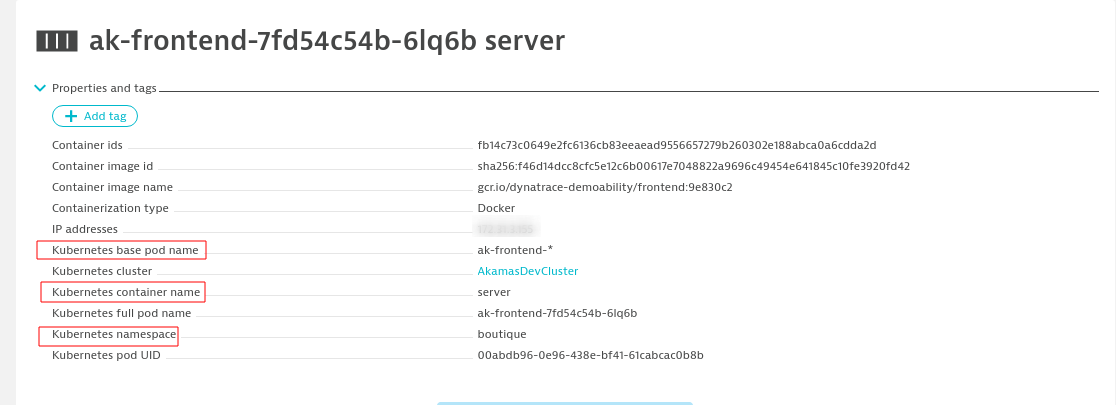
| namespace | Kubernetes namespace | Container dashboard |
| containerName | Kubernetes container name | Container dashboard |
| basePodName | Kubernetes base pod name | Container dashboard |
You can retrieve all the information to setup the properties on the top of the Dynatrace container dashboard.
The following example shows how to map a component to a container running in Kubernetes:
```yaml
dynatrace:
type: CONTAINER_GROUP_INSTANCE
kubernetes:
namespace: boutique
containerName: server
basePodName: ak-frontend-*
```
### Pod
To properly identify the set of pods to be mapped, you can specify the following properties. Any pod matching all the properties will be mapped to the component.
| Akamas property | Dynatrace property | Location |
| --------------- | ------------------ | ------------- |
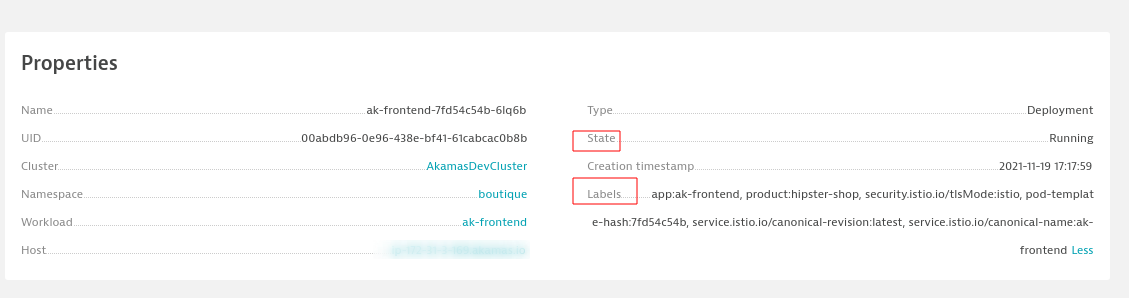
| state | State | Pod dashboard |
| namespace | Namespace | Pod dashboard |
| workloadName | Workload | Pod dashboard |
If you need to narrow your pod selection further you can also specify a set of tags as described in the **by tags**. Note that tags for Kubernetes resources are called Labels in the Dynatrace dashboard.
Labels are specified as key-value in the Akamas configuration. In Dynatrace's dashboard key and value are separated by a colon (`:`)
#### Example
The following example shows how to map a component to a pod running in Kubernetes:
```yaml
dynatrace:
type: CLOUD_APPLICATION_INSTANCE
namePrefix: ak-frontend-
kubernetes:
workloadName: ak-frontend
labels:
product: hipstershop
```
### Workload
To properly identify the set of workloads to be mapped, you can specify the following properties. Any workload matching all the properties will be mapped to the component.
| Akamas property | Dynatrace property | Location |
| --------------- | ------------------ | ------------------------------------------------------------------------------------------------------------------ |
| deploymentType | Type | Workload dashboard \* (valid values are KUBERNETES\_DEPLOYMENT KUBERNETES\_DAEMON\_SET KUBERNETES\_STATEFUL\_SET) |
| namespace | Namespace | Workload dashboard |
| detectedName | Name | Workload dashboard |
If you need to narrow your workload selection further you can also specify a set of tags as described in the **by tags**. Note that tags for Kubernetes resources are called Labels in the Dynatrace dashboard.
Labels are specified as key-value in the Akamas configuration. In Dynatrace's dashboard key and value are separated by a colon (`:`)
#### Example
```yaml
dynatrace:
type: CLOUD_APPLICATION
namePrefix: ak-frontend
kubernetes:
namespace: boutique
detectedName: ak-frontend
deploymentType: KUBERNETES_DEPLOYMENT
labels:
product: hipstershop
```
#### Container, Pod, or Workload?
Please note, that when you are mapping components to Kubernetes entities the property `type` is required to instruct Akamas on which type of entity you want to map.\
Dynatrace maps Kubernetes entities to the following types:
| Kubernetes type | Dynatrace type |
| ---------------- | ----------------------------- |
| Docker container | CONTAINER\_GROUP\_INSTANCE |
| Pod | CLOUD\_APPLICATION\_INSTANCE |
| Workload | CLOUD\_APPLICATION |
| Namespace | CLOUD\_APPLICATION\_NAMESPACE |
| Cluster | KUBERNETES\_CLUSTER |
## Improve component mapping with type
You can improve the matching of components with Dynatrace by adding a `type` property in the component definition, this property will help the provider match only those Dynatrace entities of the given type.
```yaml
name: MyComponent
properties:
dynatrace:
type: SERVICE # the type helps the mapping by tags by filtering down entities that are only services
tags:
environment: test
"[AWS]dynatrace-monitored": true
```
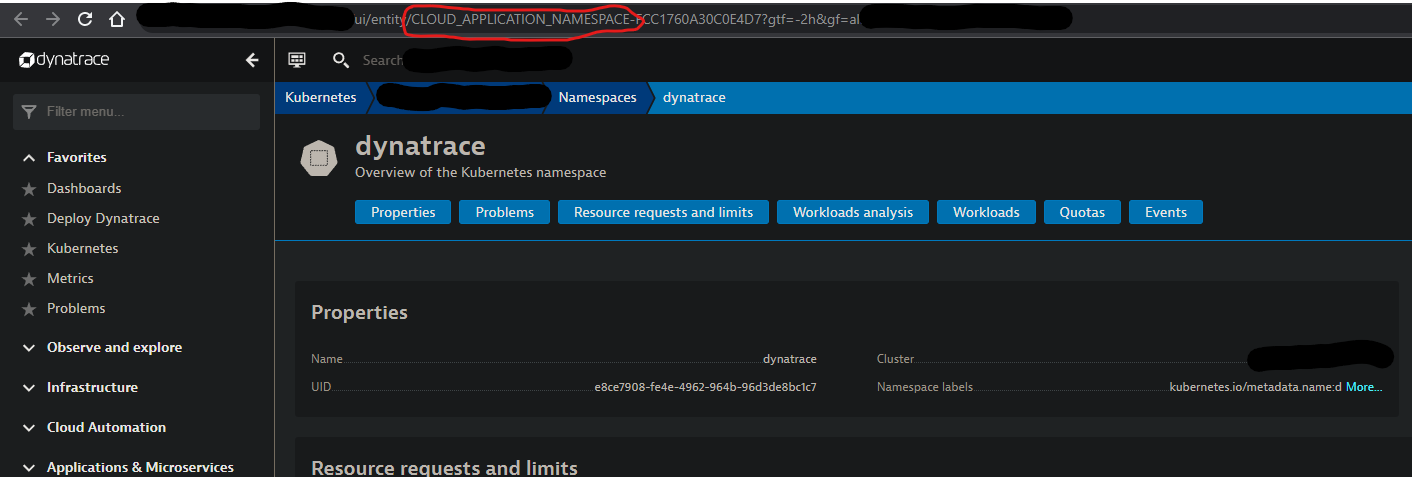
The type of an entity can be retrieved from the URL of the entity’s dashboard
Available entity types can be retrieved, from your Dynatrace instance, with the following command:
```bash
curl 'https:///api/v2/entityTypes/?pageSize=500' \
--header 'Authorization: Api-Token '
```
## Mapping multiple entities in one component
In some circumstances, you might want to map multiple Dynatrace entities (e.g. a set of hosts) to the same Akamas component and import aggregated metrics.
This can be easily done by using tags. If Akamas detects that multiple entities have been mapped to the same component it will try to aggregate metrics; some metrics, however, can not be automatically aggregated.
To force aggregation on all available metrics you can add the `mergeable: true`property to the component under the Dynatrace element.
```yaml
name: MyComponent
properties:
dynatrace:
mergeable: true
tags:
environment: test
[AWS]dynatrace-monitored: true
```