# Create Dynatrace telemetry instances
The installed provider is shared with all users of your Akamas installation and can monitor many different systems, by configuring appropriate telemetry provider instances.
To create an instance of the Dynatrace provider, build a YAML file (`instance.yml` in this example) with the definition of the instance:
```yaml
# Dynatrace Telemetry Provider Instance
provider: Dynatrace
config:
url: https://wuy711522.live.dynatrace.com
token: XbERgThisIsAnExampleToken
```
Then you can create the instance for the `system` using the Akamas CLI:
```bash
akamas create telemetry-instance instance.yml system
```
### Configuration options
When you create an instance of the Dynatrace provider, you should specify some configuration information to allow the provider to correctly extract and process metrics from Dynatrace.
You can specify configuration information within the `config` part of the YAML of the instance definition.
#### Required properties
* `url` - URL of the Dynatrace installation API (see to retrieve the URL of your installation)
* `token` - A Dynatrace API Token with the [proper permissions](https://docs.akamas.io/akamas-docs/3.6/integrating/integrating-telemetry-providers/dynatrace-provider/..#permissions)
#### Collect additional metrics
You can collect additional metrics with the Dynatrace provider by using the `metrics` field:
```yaml
config:
url: https://wuy71982.live.dynatrace.com
token: XbERgkKeLgVfDI2SDwI0h
metrics:
- metric: "akamas_metric" # extra akamas metrics to monitor
datasourceMetric: builtin:host:new_metric # query to execute to extract the metric
labels:
- "method" # the "method" label will be retained within akamas
```
#### Configure a proxy for Dynatrace
In the case in which Akamas cannot reach directly your Dynatrace installation, you can configure an HTTP proxy by using the `proxy` field:
```yaml
config:
url: https://wuy71982.live.dynatrace.com
token: XbERgkKeLgVfDI2SDwI0h
proxy:
address: https://dynaproxy # the URL of the HTTP proxy
port: 9999 # the port the proxy listens to
```
### Telemetry instance reference
This section reports the complete reference for the definition of a telemetry instance.
```yaml
provider: Dynatrace # this is an instance of the provider
config:
url: https://wuy71982.live.dynatrace.com
token: XbERgkKeLgVfDI2SDwI0h
proxy:
address: https://dynaproxy # the URL of the HTTP proxy
port: 9999 # the port the proxy listens to
username: myusername # http basic auth username if necessary
password: mypassword # http basic auth password if necessary
tags:
Environment: Test # dynatrace tags to be matched for every component
metrics:
- metric: "cpu_usage" # this is the name of the metric within Akamas
# The Dynatrace metric name
datasourceMetric: "builtin:host.cpu.usage"
extras:
mergeEntities: true # instruct the telemetry to aggregate the metric over multiple entities
aggregation: avg # The aggregation to perform if the mergeEntities property is set to true
```
This table shows the reference for the `config` section within the definition of the Dynatrace provider instance:
| Field | Type | Value restrictions | Required | Default Value | Description |
| ----------------- | ------- | --------------------------- | -------- | ------------- | -------------------------------------------------------------------------------------------------------------------------------------------------------------------------------------------------------------------------------------------------------------------------------------------------------------------- |
| `url` | String | It should be a valid URL | Yes | | The URL of the Dynatrace installation API (see the [official reference](https://www.dynatrace.com/support/help/extend-dynatrace/dynatrace-api/)) |
| `token` | String | | Yes | | The Dynatrace API Token the provider should use to interact with Dynatrace. The token should have [sufficient permissions](https://docs.akamas.io/akamas-docs/3.6/integrating/integrating-telemetry-providers/dynatrace-provider). |
| `proxy` | Object | See Proxy options reference | No | | The specification of the HTTP proxy to use to communicate with Dynatrace. |
| `pushEvents` | String | true, false | No | true | If set to true the provider will inform dynatrace of the configuration change event which will be visible in the Dynatrace UI. |
| `tags` | Object | | No | | A set of global tags to match Dynatrace entities. The provider uses these tags to apply a default filtering of Dynatrace entities for every component. |
| `maxIdsPerEntity` | Integer | 0 - 1000 | No | 0 | Limits the number of dynatrace entities mapped to a single component to extract. By default (value 0) all entities are considered. If the extraction takes too much time on Dynatrace or there are limits on the size of the requests sent to dynatarce use this property to limit the number of entities extracted. |
#### Proxy options reference
This table reports the reference for the `config` → `proxy` section within the definition of the Dynatrace provider instance:
| Field | Type | Value restrictions | Required | Default value | Description |
| ---------- | ---------------- | ------------------------ | -------- | ------------- | ----------------------------------------------------------------------------------- |
| `address` | String | It should be a valid URL | Yes | | The URL of the HTTP proxy to use to communicate with the Dynatrace installation API |
| `port` | Number (integer) | 1 <`port`<65535 | Yes | | The port at which the HTTP proxy listens for connections |
| `username` | String | | No | | The username to use when authenticating against the HTTP proxy, if necessary |
| `password` | String | | No | | The username to use when authenticating against the HTTP proxy, if necessary |
#### Metrics options reference
This table reports the reference for the `metrics` section within the definition of the Dynatrace provider instance. The section contains a collection of objects with the following properties:
| Field | Type | Value Restrictions | Required | Default value | Description |
| ------------------ | ---------------- | ----------------------------------------------------------------------------------------------------------------------------------------------- | -------- | ------------- | ------------------------------------------------------------------------------------------------ |
| `metric` | String | It must be an Akamas metric | Yes | | The name of an Akamas metric that should map to the new metric you want to gather |
| `datasourceMetric` | String | A valid Dynatrace metric | Yes | | The Dynatrace query to use to extract `metric` |
| `labels` | Array of strings | - | No | | The list of Dynatrace labels that should be retained when gathering the `metric` |
| `staticLabels` | Key-Value | - | No | | Static labels that will be attached to metric samples |
| `aggregation` | String | see [Dynatrace metric aggregations](https://www.dynatrace.com/support/help/dynatrace-api/environment-api/metric-v2/metric-selector#aggregation) | No | avg | The aggregation to perform if the mergeEntities property under the extras section is set to true |
| `extras` | Object | Only the parameter `mergeEntities` can be defined to either `true` or `false` | No | | Section for additional properties |
## Use cases
This section reports common use cases addressed by this provider.
### Collect system metrics
Check the Linux optimization pack for a list of all the system metrics available in Akamas.
As a first step to start extracting metrics from Dyntrace, [generate your API token](https://www.dynatrace.com/support/help/extend-dynatrace/dynatrace-api/basics/dynatrace-api-authentication/) and make sure it has the right permissions.
As a second step, choose a strategy to map your Linux component (*MyLinuxComponent*) with the corresponding Dyntrace entity.
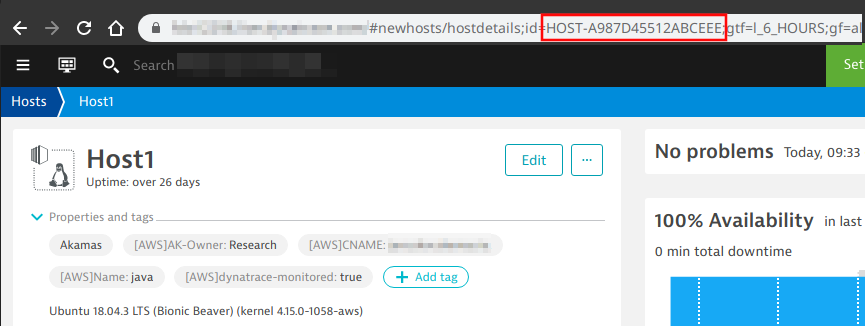
Let’s assume you want to **map by id** your Dynatrace entity, you can find the id in the URL bar of a Dyntrace dashboard of the entity:
Grab the id and add it to the Linux component definition:
```yaml
name: MyLinuxComponent
description: this is a Linux component
properties:
dynatrace:
id: HOST-A987D45512ABCEEE
```
You can leverage the name of the entity as well:
```yaml
name: MyLinuxComponent
description: this is a Linux component
properties:
dynatrace:
name: Host1
```
As a third and final step, once the component is all set, you can create an instance of the Dynatrace provider and then build your first studies:
```yaml
name: Dynatrace
config:
url: https://my_dyna_installation_url
token: MY_DYNA_TOKEN
```