# LoadRunnerEnteprise Operator

This page introduces the **LoadRunnerEnterprise** operator, a workflow operator that allows piloting performance tests on a target system by leveraging Micro Focus LoadRunner Enterprise (formerly known as Performance Center).

## Prerequisites <a href="#prerequisites" id="prerequisites"></a>

This section provides the minimum requirements that you should meet to use this operator.

### Supported versions <a href="#supported-versions" id="supported-versions"></a>

See [#supported-versions](https://docs.akamas.io/akamas-docs/3.6/integrating/integrating-telemetry-providers/loadrunner-enterprise-provider#supported-versions "mention")

## Configuration options <a href="#configuration-options" id="configuration-options"></a>

When you define a task that uses the LoadRunnerEnterprise operator you should specify some configuration information to allow the operator to connect to LoadRunner Enterprise and execute a provided test scenario.

You can specify configuration information within the `arguments` that are part of a task in the YAML of the definition of a workflow.

You can avoid specifying each configuration information at the task level, by including a `component` property with the name of a component; in this way, the operator will take any configuration information from the properties of the referenced component

## Operator arguments <a href="#configuration-options-reference" id="configuration-options-reference"></a>

This table reports the configuration reference for the `arguments` section

| Field             | Type   | Value Restrictions                                                                                                                                                       | Required | Default | Description                                                                                               |
| ----------------- | ------ | ------------------------------------------------------------------------------------------------------------------------------------------------------------------------ | -------- | ------- | --------------------------------------------------------------------------------------------------------- |
| `address`         | String | <p>A valid URL<br>I.e. <a href="http://loadrunner-enterprise.yourdomain.com/"><http://loadrunner-enterprise.yourdomain.com></a></p>                                      | Yes      | -       | The information required to connect to LoadRunner Enterprise.                                             |
| `username`        | String | -                                                                                                                                                                        | Yes      | -       | The username used to connect to LoadRunner Enterprise                                                     |
| `password`        | String | -                                                                                                                                                                        | Yes      | -       | The password for the specified user                                                                       |
| `tenantID`        | String | -                                                                                                                                                                        | No       | -       | The id of the tenant (Only for LR2020)                                                                    |
| `domain`          | String | -                                                                                                                                                                        | Yes      |         | The Domain of your load test projects.                                                                    |
| `project`         | String | -                                                                                                                                                                        | Yes      |         | The Project name of your load test projects                                                               |
| `testId`          | Number | -                                                                                                                                                                        | Yes      |         | The id of the load test. See here below how to retrieve this from LoadRunner.                             |
| `testSet`         | String | -                                                                                                                                                                        | Yes      | -       | The name of the TestSet. See here below how to retrieve this from LoadRunner.                             |
| `timeSlot`        | String | <p>A number followed by the time unit.</p><p>Values must be multiple of 15m and greater then 30m</p><p>Valid units are:</p><ul><li>m: minutes</li><li>h: hours</li></ul> | Yes      | -       | <p>The reserved time slot for the test.</p><p>Examples:</p><ul><li>1h</li><li>45m</li><li>1h30m</li></ul> |
| `component`       | String | A valid component name                                                                                                                                                   | No       | -       | The name of the component from which the operator will take its configuration options                     |
| `pollingInterval` | Number | A positive integer number                                                                                                                                                | No       | 30      | The frequency (in seconds) at which Akamas checks for the load test status                                |
| `verifySSL`       | String | True, False                                                                                                                                                              | No       | True    | Whether to validate the certificate provided by the LRE server when using an https connection             |

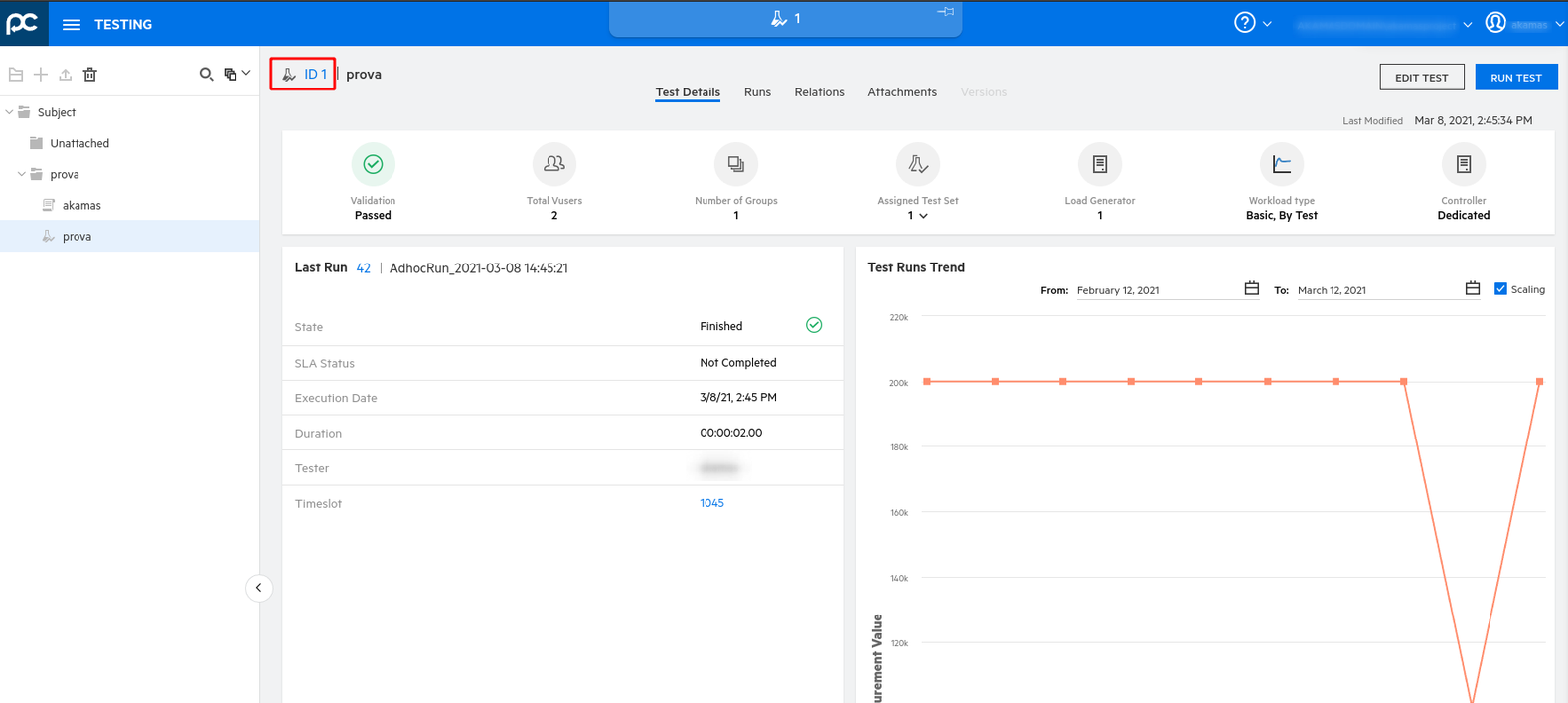
#### How to retrieve the `testId` value <a href="#how-to-retrieve-test-id-from-the-performance-center-interface" id="how-to-retrieve-test-id-from-the-performance-center-interface"></a>

The following screenshot from Performance Center shows the `testId` value highlighted.

<figure><img src="https://4103111959-files.gitbook.io/~/files/v0/b/gitbook-x-prod.appspot.com/o/spaces%2FzrIhBBVa4sw46ol13SWX%2Fuploads%2Fgit-blob-41bf270db0ed949f7871a6f6977513da4f9e138f%2Fc54c4f70-089d-4a98-a85f-3d2af10c4613.png?alt=media" alt=""><figcaption></figcaption></figure>

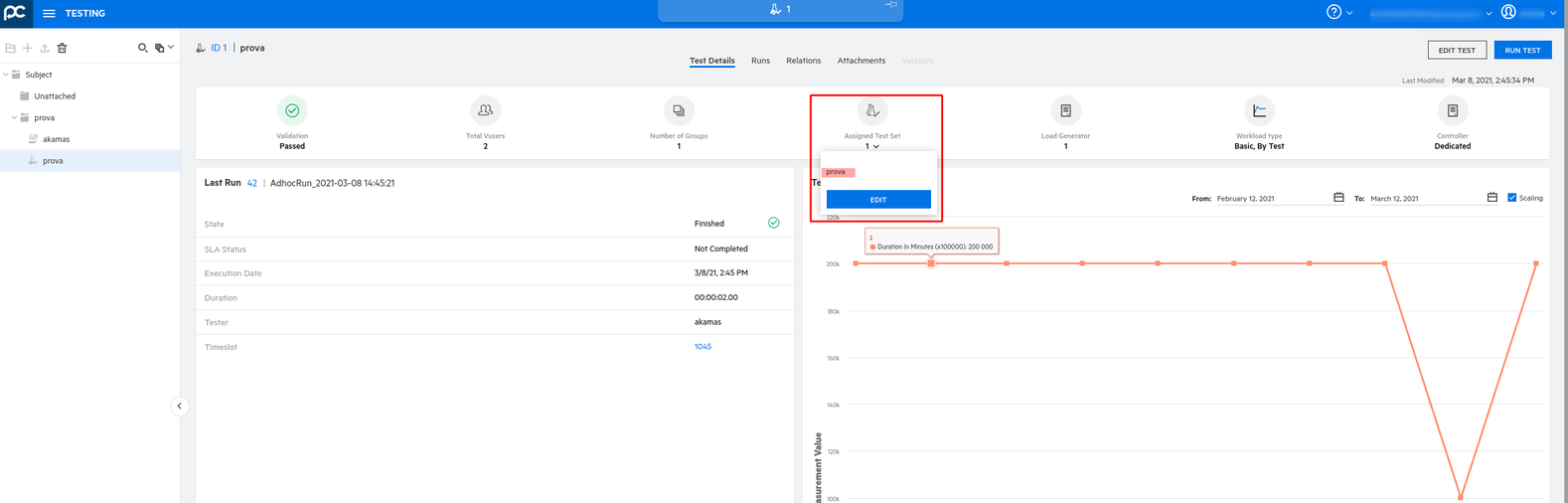
#### How to retrieve the `testSet` value <a href="#how-to-retrieve-testset-name-from-the-performance-center-interface" id="how-to-retrieve-testset-name-from-the-performance-center-interface"></a>

The following screenshot from Performance Center shows the `testSet` name highlighted.

<figure><img src="https://4103111959-files.gitbook.io/~/files/v0/b/gitbook-x-prod.appspot.com/o/spaces%2FzrIhBBVa4sw46ol13SWX%2Fuploads%2Fgit-blob-349cd59ab91174136630e7ce7584bdad7e034aeb%2F33af9920-8a00-4d01-97b0-dcf80ec8891e.png?alt=media" alt=""><figcaption></figcaption></figure>

How to retrieve the `testId` value from LoadRunner Enterprise

URL: [http://\<LRE address>/Loadtest/](http://3.142.93.12/Loadtest/)

then test management from the main menu

<figure><img src="https://4103111959-files.gitbook.io/~/files/v0/b/gitbook-x-prod.appspot.com/o/spaces%2FzrIhBBVa4sw46ol13SWX%2Fuploads%2Fgit-blob-c8c251911e07fa80a19b026d19fbe91fdd374673%2F41853c12-31de-40c1-9a6e-f944cac4e0bd.png?alt=media" alt=""><figcaption></figcaption></figure>

### Examples <a href="#examples" id="examples"></a>

#### A simple performance test <a href="#a-simple-performance-test" id="a-simple-performance-test"></a>

```yaml
name: test
operator: LoadRunnerEnterprise
arguments:
  address: "http://lr-pc.dev.akamas.io"
  username: akamas
  password: akamas
  tenantID: cf59c1a8-ad2d-4c9a-9324-edadaae5b8b9
  domain: AKAMASDOMAIN
  project: akamasproject
  testId: 1
  testSet: testsetname
  timeSlot: '30m'
```